A55 Firmware Note
Robert Correll
Author | Photographer | Musician


I wrote Sony Alpha SLT-A35/A55 For Dummies to version 1.1 of the A55's firmware (software that runs the camera's processor). If you have updated to version 2, there are some differences. The changes are:
- Picture Effects: Most notably, you can use Picture Effects like the A35. This is available by setting the Mode dial to Scene, then pressing Enter, then selecting an effect, then pressing Enter again. Refer to the Picture Effects section for the A-35 in Chapter 11 for more information.
- D-RANGE button: Use Recording menu 3 to assign different functions to the D-RANGE button.
- Display: Now you can choose to always display the shutter speed, aperture, EV scale, and the SteadyShot indicator, even when you have technically turned the recording information off (this is the default setting), or hide them in this display mode until you adjust the exposure. Use Custom menu 2 to change this behavior.
- Menu: Use Setup menu 2 to change whether the camera always takes you to the first menu (when you press Menu) or to the last menu item you selected (the new default setting).
- Enables wireless high-speed sync with an applicable external flash.
- Enables you to use the digital level when viewing on an external monitor (like the CLM-V55 Clip-on LCD Monitor).
Here is a document from Sony that describes the changes.
Camera manufacturers are always looking to fix bugs and make improvements. If you want, visit Sony's site and look at updating your firmware. Find their support page and look up The A55 camera model. Click on "Drivers & Software" tab, then select your operating system. Finally, click on Firmware. Here's the entry page for US users.
To check your A55's firmware, active the Menu system and go to Setup menu 2. Highlight Version and press Enter. You will see a screen telling you what version you have.
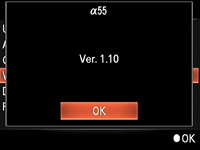
Please read all applicable warnings and notes from Sony regarding updating your camera's firmware. It's like flash-updating your computer bios. Normally, nothing goes wrong. If it does, however, your camera may be hosed. It's not something you can start and stop, and once completed, the process is not reversible. Have a nice day ;)


